Home
Samsung Galaxy S3 Review: A Classic Android Phone and Its Easy Battery Replacement
- Details
- Written by: Administrator
- Category: Smartphone Battery
- Hits: 86
The Samsung Galaxy S3 was one of the most recognizable Android flagship smartphones of its generation. Released in 2012, it arrived at an important moment in smartphone history, when manufacturers were moving from dual-core processors toward quad-core platforms and larger, more capable displays.
More than a decade later, the Galaxy S3 is no longer suitable as a modern everyday smartphone. However, it remains interesting to collectors, retro-tech enthusiasts, users who enjoy classic Android devices, and anyone looking for a highly repairable vintage phone.
One of the most useful features of the international GT-I9300 is its removable battery. Unlike most modern smartphones, the battery can be removed without heating the phone, disconnecting adhesive, or opening the main chassis.
For owners restoring an old Galaxy S3, replacing the aging battery can therefore be one of the simplest ways to bring the phone back to usable condition.
Samsung Galaxy S3 Design: A Classic Rounded Android Phone
The Galaxy S3 has a distinctive rounded body that Samsung once described as being inspired by natural forms and pebbles. Its curved edges and smooth plastic construction were very different from today's flat, angular smartphones.
The international GT-I9300 measures approximately 136.6 × 70.6/70.7 × 8.6 mm and weighs around 133 grams.
On the front is a 4.8-inch display, with Samsung's familiar physical Home button positioned below it. Capacitive Back and Menu buttons sit on either side.
This physical-button layout is now largely a piece of smartphone history, but it gives the Galaxy S3 a very different character from contemporary Android phones.
The removable plastic rear cover is even more significant from a repair perspective. Once the cover is removed, the battery compartment is immediately accessible.
For users restoring a classic device, this makes a Samsung Galaxy S3 battery replacement exceptionally straightforward.
4.8-Inch Super AMOLED Display
The GT-I9300 uses a 4.8-inch Super AMOLED display with a resolution of 1280 × 720 pixels.
By current standards, 720p is modest. In 2012, however, this was a competitive resolution for a flagship smartphone.
AMOLED technology gives the Galaxy S3 several characteristics that remain visually distinctive today:
- Deep blacks
- High contrast
- Saturated colors
- Fast pixel response
- No conventional LCD backlight
The display is one of the reasons the Galaxy S3 can still feel like a premium phone from its era.
However, age is an important consideration when buying or restoring a used S3. Older AMOLED panels can develop reduced brightness, color shifts, or burn-in. Anyone purchasing a second-hand unit should carefully inspect the display before investing in other replacement parts.
Performance: Quad-Core Hardware From 2012
The international GT-I9300 is powered by the Samsung Exynos 4412 chipset, featuring a quad-core ARM Cortex-A9 processor running at up to approximately 1.4 GHz and a Mali-400 MP4 GPU.
Storage configurations included 16GB, 32GB and, in some markets, 64GB options. The phone also supports microSD expansion.
At the time of its launch, moving to a quad-core processor was one of the Galaxy S3's major selling points. Compared with the Galaxy S II, the S3 offered improved multitasking, web browsing and gaming performance.
Today, however, the hardware is clearly limited.
Modern Android applications are generally too demanding for this generation of hardware, and software compatibility is also a major limitation. The Galaxy S3 is therefore better suited to:
- Retro Android use
- Offline music playback
- Local video playback
- Older games
- Vintage smartphone collections
- Basic offline applications
It is not a practical choice for users who require modern social media apps, current games or a fully supported everyday smartphone.
8MP Camera: A Snapshot of Smartphone Photography in 2012
The Galaxy S3 features an 8MP rear camera and a 1.9MP front-facing camera.
An 8MP camera from 2012 should not be compared directly with an 8MP camera in a modern smartphone. Image processing, sensor technology and computational photography have advanced dramatically.
In good lighting, however, the S3 can still produce attractive photographs with the characteristic color rendering of early Samsung flagship phones.
Its limitations become more obvious in difficult conditions:
- Limited shadow detail
- Noticeable nighttime noise
- Narrower dynamic range
- Highlight clipping in high-contrast scenes
- Limited detail when images are enlarged
For modern photography, the S3 is clearly outdated. For retro photography, however, these characteristics can actually be part of its appeal.
Samsung Galaxy S3 Battery: Why Replacement Matters
The original GT-I9300 uses a 3.8V, 2100mAh lithium-ion battery.
Its approximate energy capacity is:
3.8V × 2.1Ah = 7.98Wh
The most important characteristic is not simply its capacity. The battery is physically removable and does not require adhesive removal or soldering.
That makes the Galaxy S3 particularly interesting today.
After more than ten years, the original battery in many surviving units is likely to have experienced significant chemical aging. Even if the phone itself remains functional, an old battery may provide poor runtime or cause unexpected shutdowns.
A compatible Galaxy S3 replacement battery can therefore be an important part of restoring an older device.
For anyone maintaining a classic Galaxy S3, a replacement battery for Galaxy S3 is often a much more practical first repair than attempting complicated internal repairs.
Samsung Galaxy S3 Battery Replacement Guide
Replacing the battery in the Galaxy S3 is considerably easier than replacing batteries in most modern smartphones.
No heat gun is required. There is no battery adhesive to cut through, and the mainboard does not need to be removed.
What You Need
The basic requirements are:
- A compatible Samsung Galaxy S3 battery
- Your fingernail or a plastic pry tool
A plastic tool is preferable if the rear cover is difficult to remove. Avoid using a sharp metal object because it can damage the plastic clips or the phone's exterior.
Step 1: Turn Off the Galaxy S3
Before replacing the battery, shut down the phone completely.
Do not continue charging or using a battery that is visibly swollen, leaking, severely damaged or becoming unusually hot.
A damaged lithium-ion battery should never be punctured, bent or forcibly compressed.
Step 2: Remove the Rear Cover
Place the Galaxy S3 face down.
A small opening can be found between the rear cover and the phone's body near the upper section of the device.
Insert your fingernail or a plastic pry tool into the opening and gently separate the cover.
The rear panel is held in place by multiple plastic clips. There is no need to remove screws.
Work gradually around the top and sides rather than attempting to pull the entire cover off with excessive force.
Step 3: Remove the Old Battery
Once the rear cover is removed, the battery is immediately visible.
There is a small notch at the top of the battery. Insert your fingernail or a plastic tool into this area and gently lift the battery out.
The battery is not glued to the phone.
There are no battery cables that need to be disconnected and no soldering is involved.
This is one of the strongest aspects of the Galaxy S3's repair-friendly construction.
Step 4: Inspect the Battery Compartment
Before installing the new battery, take a moment to inspect the compartment.
Check for:
- Corrosion around the contacts
- Dust or debris
- Signs of liquid damage
- Damaged battery contacts
- Damaged rear-cover clips
- Problems around the NFC contacts
If there is substantial corrosion or liquid damage, simply installing another battery may not solve the problem.
Step 5: Install the New Battery
Insert the new battery in the same orientation as the original.
Make sure the metal contacts on the battery align correctly with the contacts inside the phone.
Gently press the battery into place.
There is no need for:
- Glue
- Double-sided tape
- Solder
- Screws
This simple installation process is why a Galaxy S3 replacement battery remains one of the easiest restoration parts to install on this phone.
Step 6: Reinstall the Rear Cover
Align the rear cover with the phone.
Position the edges and gently press around the perimeter until the plastic clips snap back into place.
Do not use excessive force. If the cover does not sit correctly, remove it and check whether the battery is positioned correctly.
Once the cover is secure, turn on the phone.
Battery Replacement Testing
After installing a replacement battery, several simple tests are recommended.
1. Check Startup
Make sure the Galaxy S3 starts normally.
2. Check Battery Recognition
Verify that Android correctly displays the battery percentage.
3. Test Charging
Connect a compatible charger and make sure charging begins normally.
4. Test Standby Drain
Leave the phone unused for several hours and monitor whether the battery percentage drops unusually quickly.
5. Monitor Temperature
During charging and normal operation, check for excessive heat.
If the phone becomes abnormally hot, stop using it and investigate the battery and charging system.
An Important NFC Consideration
One detail deserves particular attention when selecting a replacement battery.
The original Galaxy S3 battery design is associated with the phone's NFC system. Therefore, battery compatibility should not be determined solely by the advertised capacity.
When selecting a replacement battery, it is important to verify specifications such as:
- Battery model compatibility
- Nominal voltage
- Physical dimensions
- Contact arrangement
- NFC compatibility
- Manufacturer or supplier quality
This is especially important today because many batteries sold for older smartphones are aftermarket products, and advertised capacity does not always represent real-world performance.
Galaxy S3 Repairability
The Galaxy S3 is unusually repair-friendly compared with many modern smartphones.
Its battery can be removed without tools, while other internal components are accessible after removing the rear housing and screws.
A simple overview looks like this:
| Repair task | Approximate difficulty |
|---|---|
| Battery replacement | ★☆☆☆☆ |
| SIM card replacement | ★☆☆☆☆ |
| microSD card replacement | ★☆☆☆☆ |
| Rear-cover removal | ★☆☆☆☆ |
| Speaker replacement | ★★☆☆☆ |
| Camera replacement | ★★☆☆☆ |
| Midframe replacement | ★★★☆☆ |
| Display replacement | ★★★★☆ |
The simple Samsung Galaxy S3 battery replacement should not, however, be taken as evidence that every repair is equally easy. Display replacement and deeper internal repairs require considerably more disassembly and care.
Is the Samsung Galaxy S3 Still Worth Restoring?
The answer depends heavily on how the phone will be used.
As a modern smartphone, the Galaxy S3 has obvious limitations. Its processor, Android software support, display resolution and camera system are all far behind current devices.
As a retro smartphone, however, the situation is different.
The Galaxy S3 combines several features that have largely disappeared from modern smartphones:
- Physical Home button
- Super AMOLED display
- microSD expansion
- 3.5mm headphone jack
- Removable rear cover
- User-replaceable battery
- Compact and lightweight body
The removable battery is particularly valuable for long-term ownership.
Instead of discarding the phone when its internal battery reaches the end of its useful life, owners can install a compatible Galaxy S3 replacement battery and continue using the device for suitable offline and retro applications.
Final Verdict
The Samsung Galaxy S3 is a fascinating example of the smartphone industry in 2012.
Its Exynos 4412 processor, 4.8-inch Super AMOLED display and 8MP camera were flagship-level specifications at launch. Today, these specifications are primarily interesting from a historical and retro-tech perspective.
What makes the Galaxy S3 particularly attractive to collectors is its repair-friendly design.
The removable 2100mAh battery means that one of the most common problems affecting an aging smartphone can be addressed without opening the main chassis or dealing with difficult adhesive.
For owners restoring a GT-I9300, checking the display, charging system, motherboard and physical condition first is recommended. If the rest of the phone remains healthy, installing a quality Samsung Galaxy S3 battery can be a straightforward way to extend its useful life.
The Galaxy S3 may no longer compete with modern smartphones, but its combination of classic Samsung design, AMOLED technology, expandable storage and a genuinely removable battery makes it an appealing piece of Android history.
Ulefone Armor 7 Review: Is This Rugged Phone Still Worth It in 2026?
- Details
- Written by: Administrator
- Category: Smartphone Battery
- Hits: 84
The Ulefone Armor 7 is a rugged smartphone from an earlier generation, but it remains interesting for users who care more about durability, battery life, and outdoor reliability than flagship-level performance.
Released in the era of 4G rugged phones, the Armor 7 combines IP68 and IP69K protection, MIL-STD-810G environmental resistance, a large 5500mAh battery, Qi wireless charging, an outdoor-focused sensor package, and a reinforced chassis.
However, there is one issue that matters more in 2026 than it did when the phone was new: battery aging.
After several years of use, even a 5500mAh battery can lose a significant amount of its original capacity. For owners who want to keep using the Armor 7 as an outdoor, work, backup, or utility phone, replacing the battery can make much more sense than replacing the entire device.
Ulefone Armor 7 Review: Quick Verdict
The Ulefone Armor 7 is best described as a durability-first smartphone.
Its strongest features are not its processor or display. Instead, its value comes from its rugged construction, large battery, wireless charging, and outdoor-oriented hardware.
Pros
- IP68 water and dust resistance
- IP69K protection
- MIL-STD-810G design philosophy
- 5500mAh battery
- 10W Qi wireless charging
- 8GB RAM
- microSD expansion
- Outdoor sensors and GPS support
- Dedicated night photography hardware on some versions
- Strong physical construction
Cons
- Helio P90 is outdated in 2026
- No 5G
- 60Hz IPS display
- Android software is from an older generation
- Heavy 290g body
- Thick 13.55mm chassis
- Only 15W wired charging
- Original batteries may now be significantly degraded
Bottom line: if you already own an Armor 7, replacing an aging battery can be one of the most practical ways to extend its useful life.
Ulefone Armor 7 Specifications
| Specification | Ulefone Armor 7 |
|---|---|
| Processor | MediaTek Helio P90 |
| Process | 12nm |
| CPU | Octa-core, up to 2.2GHz |
| RAM | 8GB LPDDR4X |
| Storage | 128GB UFS 2.1 |
| Expansion | microSD |
| Display | 6.3-inch IPS LCD |
| Resolution | 2340 × 1080 |
| Rear Camera | 48MP triple-camera system |
| Front Camera | 16MP |
| Battery | 5500mAh |
| Wired Charging | 15W |
| Wireless Charging | 10W Qi |
| Protection | IP68 / IP69K |
| Military Standard | MIL-STD-810G |
| Network | 4G LTE |
| Weight | Approx. 290g |
| Thickness | Approx. 13.55mm |
| Software Era | Android 10 |
The specifications make the original design philosophy very clear: the Armor 7 was built as a rugged tool rather than as a lightweight lifestyle smartphone.
1. Rugged Design: The Real Strength of the Armor 7
The first thing you notice about the Armor 7 is its size.
At approximately 290g and 13.55mm thick, this is not a phone designed to disappear into your pocket.
But that weight has a purpose.
The chassis incorporates reinforced structural components, sealing materials, a large battery, protective layers, and ruggedized construction intended to withstand demanding environments.
This is the opposite of the modern flagship design philosophy.
A normal smartphone asks:
How thin and light can we make it?
The Armor 7 asks:
How much abuse can it survive while remaining usable?
That distinction remains important for construction workers, mechanics, technicians, warehouse staff, hikers, campers, and other users who regularly operate smartphones in difficult environments.
2. IP68 and IP69K Protection
One of the biggest reasons to consider the Armor 7 is its protection rating.
The phone was designed around IP68 and IP69K protection.
IP68 is associated with resistance against dust and water immersion under specified test conditions, while IP69K is intended for more demanding high-pressure and high-temperature water exposure.
The Armor 7 also follows the MIL-STD-810G testing framework for selected environmental conditions.
However, there is an important distinction between a new rugged phone and a used rugged phone.
After years of use, seals can deteriorate.
The phone may also have been opened for repair.
Therefore, a second-hand Armor 7 should never automatically be assumed to retain its original water resistance.
This becomes especially important after a battery replacement.
3. Display: Functional Rather Than Flagship
The Armor 7 uses a 6.3-inch FHD+ IPS LCD with a resolution of 2340 × 1080.
For navigation, messaging, equipment monitoring, web browsing, and field applications, the resolution remains perfectly usable.
The 410ppi-class pixel density also provides reasonably sharp text and graphics.
However, compared with modern smartphones, the display is clearly dated.
There is no high refresh rate, no modern OLED panel, and the bezels and waterdrop-style design look noticeably older.
For a rugged work phone, though, these limitations are less important than durability.
4. Helio P90 Performance in 2026
The MediaTek Helio P90 was a capable mobile processor when the Armor 7 was introduced.
Today, however, it is clearly an older platform.
The 12nm chipset can still handle:
- Phone calls
- Messaging
- Web browsing
- Navigation
- Basic productivity apps
- Simple field applications
But modern 3D games and demanding applications expose the limitations of the processor and PowerVR GPU.
The important point is that the Armor 7 does not need flagship performance to remain useful.
If your workload is primarily communication, navigation, field work, equipment monitoring, or emergency backup use, the older processor can still be adequate.
5. 8GB RAM Helps Extend Its Usability
One specification that has aged better is the 8GB RAM configuration.
The Armor 7 combines 8GB LPDDR4X memory with 128GB UFS 2.1 storage.
Although the chipset is old, having 8GB of RAM prevents the phone from feeling as restricted as some older rugged devices with only 3GB or 4GB of memory.
The microSD card slot is another practical advantage for users who store maps, photos, documents, videos, or field records locally.
6. The 5500mAh Battery Is Still One of Its Best Features
The 5500mAh battery is arguably the most important specification for long-term Armor 7 ownership.
When new, the large battery gave the phone an advantage over many conventional smartphones.
The combination of:
- 5500mAh capacity
- 60Hz LCD
- 4G connectivity
- Helio P90
- No 5G modem
can still provide respectable endurance for light and moderate workloads.
For field workers, this is particularly useful.
A phone that can remain operational for a long workday is often more valuable than a thinner phone with a faster processor.
However, battery capacity printed on the original specification sheet does not tell you the condition of a battery that has already been used for years.
7. Why the Armor 7 Battery Matters More in 2026
The biggest weakness of an old Armor 7 is often not the processor.
It is the battery.
Lithium-ion and lithium-polymer batteries naturally lose capacity over time. Charging cycles, heat, storage conditions, and age can increase internal resistance and reduce usable capacity.
A worn battery may cause:
- Rapid percentage drops
- Unexpected shutdowns
- Poor standby time
- Charging problems
- Increased heat
- Battery percentage fluctuations
- Shorter screen-on time
For example, if an old battery has degraded to around 70% of its original effective capacity, a phone that originally had a 5500mAh battery may no longer deliver anything close to the original endurance.
This is why checking the Armor 7 battery should be a priority when buying a used device.
8. Armor 7 Battery Replacement: A Practical Upgrade
If the phone itself is still in good condition, replacing the battery can be a much more economical solution than purchasing another rugged phone.
A compatible Armor 7 battery is generally specified around:
- Model compatibility: Ulefone Armor 7
- Capacity: 5500mAh
- Nominal voltage: 3.85V
- Rechargeable lithium battery
- Internal installation
Before ordering an Ulefone Armor 7 battery, however, it is important to compare the original battery label, connector, cable arrangement, and physical dimensions.
Third-party replacement batteries can sometimes differ in connector or flex-cable layout even when the advertised capacity appears identical.
For this reason, do not buy solely because a listing says “5500mAh.”
9. When Should You Replace the Armor 7 Battery?
A battery replacement becomes particularly worthwhile if you notice several of the following symptoms.
Rapid battery drain
The percentage falls unusually quickly even during light use.
Unexpected shutdowns
The phone suddenly powers off while the battery indicator still shows 20%, 30%, or even 40%.
Poor standby performance
The phone loses a large percentage of its charge overnight without significant use.
Charging abnormalities
The phone struggles to reach 100%, the percentage jumps unexpectedly, or charging becomes unusually hot.
Physical swelling
This is the most serious warning sign.
If the display or rear cover begins lifting away from the frame, stop using the phone and do not continue charging it.
A swollen lithium battery should be handled by an experienced repair professional.
10. Armor 7 Battery Replacement Difficulty
Replacing the Armor 7 battery is possible, but this is not a simple removable-battery design.
I would rate the repair difficulty around 7/10 for a DIY technician.
The main challenge is not the number of screws.
The difficulty comes from the rugged construction and sealing system.
The repair may involve:
- Adhesive
- Sealing materials
- Tight internal clearances
- Battery adhesive
- Flex cables
- Waterproof structural components
More importantly, opening the phone means that the original factory sealing condition can no longer be assumed.
11. What You Need to Replace the Battery
For an Armor 7 battery replacement, prepare appropriate tools before opening the phone.
Recommended equipment includes:
- Plastic pry tools
- Suction cup
- Small Phillips screwdriver
- ESD-safe tweezers
- Heating pad
- 70–99% isopropyl alcohol
- Replacement battery
- New sealing adhesive
- Lint-free cloth
- ESD protection
Avoid using sharp metal tools directly against the battery.
A punctured lithium battery can enter thermal runaway.
12. Step 1: Power Down Completely
Before beginning an Armor 7 battery replacement, back up important data.
Then:
- Shut down the phone.
- Disconnect the charger.
- Remove the SIM card if necessary.
- Remove the microSD card if necessary.
- Make sure the phone is completely powered off.
Never attempt internal battery work while the phone is charging.
13. Step 2: Carefully Open the Rugged Housing
The Armor 7's sealing structure means that opening the phone requires patience.
Controlled, even heating can soften adhesive and make separation easier.
Avoid excessive temperatures.
Do not concentrate heat directly over:
- The battery
- Display
- Cameras
- Mainboard
- Flex cables
The goal is to soften adhesive rather than cook the internal components.
14. Step 3: Separate the Housing Slowly
Insert a plastic pry tool only a small distance into the seam.
Move gradually around the perimeter.
Do not insert a tool deeply and twist aggressively.
The internal components can be positioned close to the housing, and careless prying can damage cables, antennas, sealing components, or the battery.
This is one reason why rugged phones can actually be more difficult to repair than conventional smartphones.
15. Step 4: Disconnect the Battery First
Once the phone is open, the priority should be disconnecting the battery.
Locate the battery connector and carefully disconnect it using an appropriate plastic pry tool.
Do not use metal tweezers around an exposed battery connector if there is a risk of shorting contacts.
Only after the battery has been electrically disconnected should you proceed with battery removal.
16. Step 5: Remove the Old Battery
Battery removal is the most safety-sensitive part of the repair.
The battery may be secured with adhesive.
Use controlled heat and gradually loosen the adhesive.
If necessary, a small amount of isopropyl alcohol can assist with adhesive separation, but do not flood the interior of the phone.
Never:
- Puncture the battery
- Bend it sharply
- Pull on the battery flex cable
- Insert a knife into the battery
- Apply concentrated high heat
- Continue heating a swollen battery
If the battery is swollen, damaged, leaking, or physically deformed, professional repair is the safer option.
17. Step 6: Install the New Ulefone Armor 7 Battery
Before installation, compare the new Ulefone Armor 7 battery with the original.
Check:
- 5500mAh capacity
- 3.85V rating
- Connector type
- Flex-cable position
- Battery dimensions
- Label and model compatibility
Remove old adhesive residue carefully.
Install fresh battery adhesive, position the replacement battery correctly, and reconnect the battery cable.
Do not force the connector.
18. Test Everything Before Sealing the Phone
Do not immediately close the phone after installing the new battery.
First power it on and test:
- Battery recognition
- Wired charging
- Wireless charging
- USB-C connection
- Touchscreen
- Display
- Cameras
- Fingerprint sensor
- GPS
- Wi-Fi
- Bluetooth
- NFC
- Heart-rate sensor
- Speaker
- Microphone
Only after these functions have been verified should the housing be permanently resealed.
19. The Biggest Problem After Battery Replacement: Waterproofing
This is the most important point in the entire repair process.
The Armor 7 was originally designed with IP68 and IP69K protection.
But after opening the phone, you should not assume those ratings remain valid.
Water resistance depends on factors such as:
- Sealing material
- Seal condition
- Rear-cover pressure
- Screw torque
- Housing alignment
- Port sealing
- Structural condition
A normal DIY repair does not provide the same controlled pressure and water testing used during factory qualification.
Therefore, after an Armor 7 battery replacement, the safest approach is to treat the phone as non-waterproof unless it has been professionally resealed and tested.
Do not take a repaired Armor 7 swimming simply because the phone originally carried an IP68/IP69K rating.
20. How to Reseal the Armor 7
If you are experienced with smartphone repair, use an appropriate phone sealing material or replacement gasket designed for the device.
Avoid:
- Super glue
- Hot glue
- General-purpose adhesive
- Excessive silicone sealant
The sealing layer should be continuous and evenly applied.
There should be no obvious:
- Gaps
- Air bubbles
- Contamination
- Adhesive around cameras
- Adhesive over connectors
- Housing deformation
The rear cover must sit evenly against the frame.
21. Does a New Battery Need Calibration?
A new battery does not need a special procedure to restore its physical capacity.
If the battery percentage appears inaccurate immediately after installation, one normal charge-and-use cycle can help the operating system refine its battery estimation.
However, repeatedly draining a lithium battery to 0% is not recommended as a regular maintenance practice.
The purpose of calibration is simply to improve percentage estimation.
It does not restore worn battery chemistry.
22. Armor 7 Wireless Charging Is Still Useful
The 10W Qi wireless charging feature is one of the Armor 7's more interesting characteristics.
Modern phones can charge considerably faster, but wireless charging has a practical advantage for rugged devices.
It reduces the number of times the USB-C port needs to be physically connected and disconnected.
For a phone used around dust, mud, water, workshops, and construction environments, minimizing unnecessary port handling can be useful.
That makes wireless charging particularly relevant for long-term ownership.
23. Camera System: More Interesting Than the Specifications Suggest
The Armor 7's camera configuration depends partly on the specific production version.
Some 2019-era units were marketed with a 48MP main camera, a dedicated night-vision camera, and an additional telephoto-oriented camera.
Later product information may describe the auxiliary cameras differently.
Therefore, buyers of used units should verify the actual hardware rather than relying exclusively on a generic three-camera specification.
The dedicated night photography capability is particularly interesting for:
- Night inspections
- Camping
- Outdoor work
- Equipment checks
- Low-light environments
It should not, however, be confused with the computational night photography systems found in modern flagship phones.
24. Outdoor Features Make the Armor 7 Different
The Armor 7 was designed to provide more than basic smartphone functions.
Depending on configuration, the phone includes features such as:
- GPS
- GLONASS
- BeiDou
- Galileo
- Step counting
- Heart-rate monitoring
- Outdoor-related sensors
These features reinforce its original identity as a field-oriented smartphone.
For a mechanic, technician, hiker, or construction worker, practical durability may matter more than benchmark performance.
25. Who Should Still Buy an Armor 7 in 2026?
The Armor 7 makes the most sense for users looking for a low-cost rugged secondary device.
Potential applications include:
Construction
Useful for calls, documentation, navigation, and work-site communication.
Workshops
The thick housing and rugged design are better suited to environments where a conventional flagship could easily be damaged.
Hiking and camping
The large battery and outdoor features remain useful.
Fishing and outdoor recreation
The rugged design can be advantageous, although an older or repaired unit should not be exposed to water without professional testing.
Backup phone
It can serve as a dedicated emergency or work phone while your main smartphone handles daily tasks.
26. Who Should Avoid the Armor 7?
The Armor 7 is not a good choice if your priorities are:
- 5G
- High-refresh-rate displays
- OLED
- Modern gaming
- Advanced AI features
- Flagship photography
- Long-term software support
- Fast charging
- Lightweight construction
In these areas, modern rugged smartphones are significantly more advanced.
27. Should You Replace the Phone or the Battery?
This is where the Armor 7 becomes particularly interesting.
If the phone has:
- A good display
- Working cameras
- Healthy charging circuitry
- Functional USB-C
- Good buttons
- Intact housing
- No major motherboard problems
then replacing the battery may be the more sensible investment.
A 5500mAh Armor 7 battery can potentially restore much of the phone's original endurance without replacing the entire device.
For an existing Armor 7 owner, this can extend the useful life of a rugged phone that still meets their practical requirements.
28. How to Choose a Replacement Battery
When shopping for an Armor 7 battery, check more than capacity.
The most important points are:
Model compatibility: Ulefone Armor 7
Capacity: approximately 5500mAh
Voltage: approximately 3.85V
Connector: must match the original
Flex cable: position and shape should match
Physical dimensions: must fit the original battery compartment
Battery condition: prefer a newly manufactured replacement from a reputable supplier
The capacity number alone is not enough to establish compatibility.
29. Long-Term Maintenance After Battery Replacement
Once the new battery is installed, regular maintenance can help maximize the life of the phone.
Check the USB-C port periodically for:
- Dust
- Sand
- Lint
- Corrosion
- Loose connections
Before charging, make sure the port is completely dry.
Also inspect the housing for:
- Cracks
- Separation
- Damaged seals
- Loose screws
- Deformation
If the phone has been opened for repair, remember that its original waterproof rating should no longer be taken for granted.
30. Ulefone Armor 7 Review: Final Score
| Category | Rating |
|---|---|
| Rugged Protection | ★★★★★ |
| Build Quality | ★★★★★ |
| Battery Potential | ★★★★ |
| Display | ★★★ |
| Performance | ★★½ |
| Camera | ★★★ |
| Outdoor Features | ★★★★ |
| Wireless Charging | ★★★★ |
| Software Experience | ★★ |
| Repairability | ★★★ |
| 2026 Main Phone | ★★ |
| Used Outdoor Phone | ★★★½ |
Final Verdict: The Battery Can Give the Armor 7 a Second Life
The Ulefone Armor 7 is no longer a modern performance smartphone.
The Helio P90 is old, the 60Hz IPS display is dated, 5G is missing, wired charging is slow, and the software platform belongs to an earlier generation.
But those weaknesses do not erase what made the phone interesting.
Its rugged construction, IP68/IP69K protection, MIL-STD-810G positioning, 5500mAh battery, Qi wireless charging, and outdoor-focused hardware still give it a clear purpose.
For a 2026 buyer, however, the most important question is not simply:
“Is the Armor 7 still powerful enough?”
It is:
“Is the battery still healthy?”
If the original battery has degraded significantly, a compatible Ulefone Armor 7 battery can be a practical way to extend the life of an otherwise functional rugged phone.
A replacement battery for Armor 7 is especially worth considering when the phone remains physically intact but suffers from rapid battery drain, unexpected shutdowns, poor standby time, or reduced operating time.
Just remember one critical rule:
Battery replacement can restore battery performance, but it does not automatically restore the original waterproof rating.
After opening an Armor 7, the safest assumption is that the phone is no longer fully waterproof unless its sealing has been professionally restored and tested.
For owners who understand this limitation, the Armor 7 can still be a surprisingly useful rugged workhorse in 2026—and a fresh battery may be the simplest way to give this old armored phone a second life.
Ulefone Armor 7 Review: A Rugged Smartphone for Extreme Conditions
- Details
- Written by: Administrator
- Category: Smartphone Battery
- Hits: 599
If you’re looking for a smartphone that can withstand extreme environments while delivering solid performance, the Ulefone Armor 7 is a great option. Designed for adventurers, construction workers, and outdoor enthusiasts, this device boasts an impressive combination of durability, high-end specs, and long battery life. In this review, we’ll take a deep dive into the Ulefone Armor 7 and introduce the best battery replacement option—the new replacement battery Ulefone Armor-7 for Ulefone Armor 7.
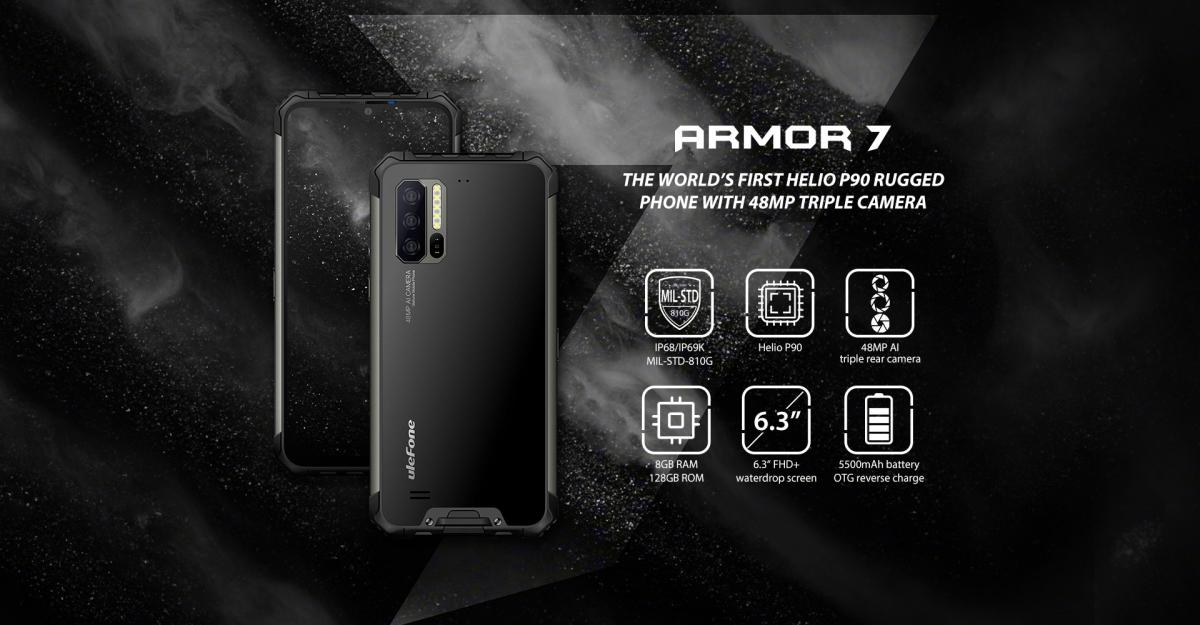
Rugged Design and Durability
The Ulefone Armor 7 is built like a tank, featuring a reinforced metal and rubber body that provides excellent shock resistance. With an IP68/IP69K rating, this phone is waterproof, dustproof, and resistant to extreme temperatures. Whether you’re hiking through rough terrains or working on a construction site, the Ulefone Armor 7 can handle it all.
Display and Performance
This rugged smartphone features a 6.3-inch IPS LCD display with a 2340×1080 resolution, offering crisp and clear visuals. The display is protected by Corning Gorilla Glass, ensuring resistance to scratches and minor impacts.
Under the hood, the Ulefone Armor 7 is powered by a MediaTek Helio P90 processor, paired with 8GB of RAM and 128GB of internal storage. This setup ensures smooth multitasking and solid performance for everyday tasks and gaming. The phone also supports microSD expansion, allowing you to increase storage as needed.
Impressive Camera System
For photography enthusiasts, the Ulefone Armor 7 offers a triple-camera setup on the back:
-
48MP primary sensor for high-quality images
-
16MP night vision camera for low-light photography
-
8MP telephoto lens for zoomed-in shots
The front-facing 16MP camera delivers clear and detailed selfies, making the phone an all-around great option for capturing memories in any environment.
Battery Life and the Best Replacement Option
The Ulefone Armor 7 packs a 5500mAh battery, providing long-lasting power for extended outdoor activities. It supports fast charging and wireless charging, ensuring convenience when recharging.
However, over time, batteries degrade and need replacement. That’s where the new replacement battery Ulefone Armor-7 for Ulefone Armor 7 comes in. This high-quality 5500mAh Li-ion battery is designed to restore your phone’s power capacity to its peak performance. You can purchase it here: new replacement battery Ulefone Armor-7 for Ulefone Armor 7.
Why Choose the new replacement battery Ulefone Armor-7 for Ulefone Armor 7?
-
Certified Quality: The battery meets CE, UL, ROHS, ISO9001/9002 certifications, ensuring safety and reliability.
-
Long-Lasting Performance: Supports at least 600 charge cycles, providing extended usage.
-
1-Year Warranty: Backed by a one-year warranty and a 30-day money-back guarantee.
-
Perfect Compatibility: Specifically designed for the Ulefone Armor 7, ensuring seamless functionality.
For those needing a new power source for their rugged smartphone, the new replacement battery Ulefone Armor-7 for Ulefone Armor 7 is the best solution. Grab yours today from Batterie Star.
Final Verdict
The Ulefone Armor 7 is an outstanding rugged smartphone that offers durability, powerful performance, and a great camera setup. With its IP68/IP69K protection and 5500mAh battery, it’s perfect for extreme conditions. However, when the battery eventually wears out, the new replacement battery Ulefone Armor-7 for Ulefone Armor 7 is your best option to keep your device running like new.
For anyone seeking a smartphone that won’t let them down in tough environments, the Ulefone Armor 7 is a solid choice. And for those needing a replacement battery, make sure to check out the new replacement battery Ulefone Armor-7 for Ulefone Armor 7 today!
Still Using a BlackBerry KEY2 in 2025? Here’s the Real Secret to Keeping It Alive
- Details
- Written by: Administrator
- Category: Smartphone Battery
- Hits: 882
Let’s be real—if you're still holding onto a BlackBerry KEY2, you’re either incredibly loyal to the QWERTY lifestyle or just tired of the same glass rectangles everyone else carries around. Either way, I totally get it. The KEY2 had something special when it launched: real buttons, strong privacy tools, and battery life that actually lasted more than a day.
But if your once-reliable phone is now struggling to stay alive past lunch, you don’t need to toss it. The fix is simpler than you think: get a new battery. Specifically, the Tlp035B1 BlackBerry KEY2 cellphone 3.85V/4.40V 3500mAh Replacement Smartphone Battery.
Why People Still Love the KEY2
You know what the KEY2 nailed? Focus. No TikTok time-warp. No accidental screen touches. Just fast typing, serious security, and that beautiful, retro-modern keyboard that makes emails kind of... fun?
But that was 2018. By now, most KEY2s are slowing down—especially when it comes to battery life. If yours dies halfway through a Zoom call or a long train ride, trust me: it’s not your fault. Batteries wear out. Fortunately, the Tlp035B1 BlackBerry KEY2 cellphone 3.85V/4.40V 3500mAh Replacement Smartphone Battery is made exactly for this situation. Pop it in, and you’re basically rolling back the clock.
The Battery Swap That Makes a Big Difference
Back in the day, the KEY2 could go a full day (or more) without a recharge. But now? That once-strong 3500mAh battery might be begging for mercy. Luckily, replacing it isn’t just possible—it’s affordable and super effective.
The Tlp035B1 BlackBerry KEY2 cellphone 3.85V/4.40V 3500mAh Replacement Smartphone Battery gives you the same capacity and voltage as the original, meaning your phone gets a second life without compromises. And you get to keep your keyboard and headphone jack too. Win-win.
Final Words: Don’t Trash It, Refresh It
Sure, the KEY2 isn’t perfect. The camera’s just okay, and the screen’s small by today’s standards. But if you're using it for what it does best—typing, privacy, battery life—it still shines.
So before you retire your trusty BlackBerry, try giving it a fresh power source. A Tlp035B1 BlackBerry KEY2 cellphone 3.85V/4.40V 3500mAh Replacement Smartphone Battery might be all it takes to make your old phone feel brand new.
Page 41 of 88