The Kindle Keyboard, also known as the Kindle 3, was released by Amazon on July 28, 2010. This third-generation e-reader offered significant advancements over its predecessors, making it one of the most popular Kindle models at the time. This article provides an in-depth review of the Kindle Keyboard’s features, its advantages, and a detailed guide for replacing its battery to extend its usability.
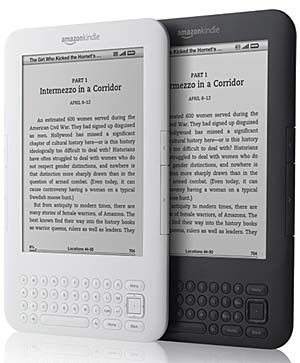
Key Features of Kindle Keyboard (Kindle 3)
1. E-Ink Display for an Enhanced Reading Experience
The Kindle Keyboard is equipped with a 6-inch electronic ink (E-Ink) display, which provides a sharp and clear reading experience. Compared to earlier versions, the contrast of this display was improved by 50%, making text and images more legible even in direct sunlight.
2. Compact and Lightweight Design
Despite featuring a physical keyboard, the Kindle Keyboard was designed to be 21% smaller and 17% lighter than its predecessor. Weighing approximately 240 grams, it offers enhanced portability, making it ideal for long reading sessions.
3. Extended Battery Life
One of the most notable features of the Kindle Keyboard is its impressive battery life. With wireless connectivity turned off, a single charge allows up to one month of usage, making it an excellent choice for frequent travelers and avid readers.
4. Ample Storage Capacity
The device includes 4GB of internal storage, which allows users to store approximately 3,500 e-books, eliminating the need for external storage options.
5. Multiple Connectivity Options
The Kindle Keyboard offers both Wi-Fi and 3G connectivity options. The 3G model enables users to download books and sync their Kindle libraries even without access to Wi-Fi networks.
6. Physical Keyboard for Efficient Navigation
Unlike newer touch-screen Kindles, the Kindle Keyboard features a full QWERTY keyboard that enhances note-taking and text searches within e-books. This feature makes it particularly suitable for academic and professional users.
7. Enhanced PDF Support
This model significantly improved PDF handling, offering features like zooming, annotation, and text selection, making it more versatile for document reading.
Battery Replacement for Kindle Keyboard (Kindle 3)
Over time, the battery life of any electronic device will degrade. If you find that your Kindle Keyboard is not holding a charge as well as it once did, replacing the battery can significantly improve performance. The Amazon Kindle GP-S10-346392-0100 replacement battery is the perfect solution for restoring your Kindle Keyboard’s battery life.

Why Choose the Amazon Kindle GP-S10-346392-0100 Replacement Battery?
-
High Capacity & Performance: With a 1750mAh/6.5Wh capacity, this lithium-ion battery provides long-lasting power.
-
Certified for Safety: It meets international safety standards, including CE, UL, ROHS, and ISO9001/9002 certifications.
-
Guaranteed Quality: Each battery is tested to ensure durability and optimal performance.
-
One-Year Warranty & 30-Day Money-Back Guarantee: Providing peace of mind with every purchase.
Purchase the Amazon Kindle GP-S10-346392-0100 replacement battery here
How to Replace the Kindle Keyboard Battery
Tools Required:
-
Small Phillips screwdriver
-
Plastic prying tool
Step-by-Step Guide:
-
Power Off the Kindle: Ensure your Kindle Keyboard is turned off before beginning the process.
-
Remove the Back Cover: Use a plastic prying tool to carefully remove the back cover without damaging the casing.
-
Locate the Battery: The battery is secured with a small screw and a connector.
-
Unscrew and Disconnect the Battery: Use a Phillips screwdriver to remove the battery screw, then gently unplug the battery connector.
-
Insert the New Battery: Connect the Amazon Kindle GP-S10-346392-0100 replacement battery, ensuring a secure fit.
-
Reassemble the Device: Secure the battery with the screw, replace the back cover, and power on your Kindle to confirm proper functionality.
For detailed specifications and to purchase your replacement battery, visit: https://www.batteriestar.com/detail/Amazon%20Kindle/GP-S10-346392-0100/1737328
Conclusion
The Kindle Keyboard (Kindle 3) remains a beloved e-reader due to its long battery life, high-contrast E-Ink display, and efficient keyboard navigation. However, as battery life diminishes over time, replacing the battery with the Amazon Kindle GP-S10-346392-0100 can restore the device to optimal performance. By following this guide, Kindle users can continue to enjoy uninterrupted reading for years to come.
For a reliable and high-quality replacement battery, purchase now at: https://www.batteriestar.com/detail/Amazon%20Kindle/GP-S10-346392-0100/1737328