Home
Ulefone Tab A11 Review: A Budget Tablet That Deserves a Second Life with the Right Replacement Battery
- Details
- Written by: Administrator
- Category: Tablet Battery
- Hits: 19
Not every tablet needs a powerful processor or a premium price tag to be useful. Sometimes, a comfortable screen, reliable everyday performance, and enough battery capacity to get through a busy day are all that really matter. The Ulefone Tab A11 follows this practical approach, offering an 11-inch display, 4G connectivity, four speakers, and an 8,800mAh built-in battery.
But what happens when the battery that once powered hours of streaming and browsing begins to lose its stamina?
In this Ulefone Tab A11 review, we take a closer look at what the tablet offers, where it makes compromises, and why finding the right Ulefone Tab A11 Replacement Battery can be a sensible option for owners who want to keep their device in service.
Ulefone Tab A11: A Tablet Built Around Everyday Convenience
The standard Ulefone Tab A11 is designed for users who spend their time watching videos, reading documents, browsing the internet, and attending online classes. Rather than competing directly with premium productivity tablets, it focuses on the features that matter most for everyday use.
Here is a quick overview of the hardware.
| Specification | Details |
|---|---|
| Display | 11-inch IPS LCD |
| Resolution | 1920 × 1200 pixels |
| Refresh rate | 90Hz |
| Processor | Unisoc T620 |
| Memory | 4GB or 6GB RAM |
| Storage | 128GB or 256GB |
| Operating system | Android 14 |
| Battery | 8,800mAh built-in lithium-polymer |
| Charging | USB-C, up to 18W |
| Audio | Four speakers and 3.5mm headphone jack |
| Connectivity | 4G LTE, Wi-Fi and Bluetooth |
| Expandable storage | microSD, officially listed up to 2TB |
| Weight | Approximately 500.5g |
These specifications refer to the standard Tab A11. The Tab A11 Pro has a different hardware configuration, so buyers should check the exact model before ordering accessories or internal components.
1. Display Experience: More Room for Work and Entertainment
The 11-inch screen is arguably one of the tablet's strongest features. With a 1920 × 1200 resolution, text remains suitable for reading, documents are comfortable to review, and videos have enough detail for everyday entertainment.
The 90Hz refresh rate is another welcome addition. Scrolling through long web pages, navigating application menus, and moving between compatible interface animations can feel smoother than on a conventional 60Hz screen.
For students, the display provides enough room to read course materials while taking notes. For casual users, it works well for streaming services, digital magazines, and social media.
Naturally, there are limits. The IPS LCD panel does not offer the same black levels as an OLED screen, and the absence of independently verified brightness and color measurements makes it difficult to judge its performance in demanding viewing conditions.
Still, for its intended audience, the Tab A11 delivers a useful balance between screen size and everyday practicality.
2. Performance Review: Reliable for the Basics
The Unisoc T620 processor gives the standard Ulefone Tab A11 enough computing power for common tablet activities.
Browsing, email, online learning, video playback, messaging, and document editing are the kinds of workloads this device is best suited to handle. Casual games should also be reasonable, depending on their graphics requirements.
The experience becomes less predictable with demanding 3D games, heavy multitasking, and intensive creative applications. Users who frequently switch between many large applications may benefit from the 6GB RAM configuration rather than the entry-level 4GB option.
Storage capacity also deserves attention. The 128GB version may be sufficient for users who primarily stream content, while 256GB offers more room for downloaded movies, offline lessons, photographs, and documents. A compatible microSD card can provide additional storage for supported files.
The tablet runs Android 14, but buyers should verify the current availability of security updates and the compatibility of their preferred applications.
Our assessment: The Tab A11 is a practical everyday tablet rather than a performance-focused machine. Its value lies in usability and features, not benchmark-leading speed.
3. Four Speakers and 4G: Useful Features Beyond the Screen
A large display is only part of the multimedia experience. The Ulefone Tab A11 also includes four speakers, making it a useful companion for films, online tutorials, and video calls.
Speaker count alone does not guarantee outstanding sound quality, however. Bass response, distortion at higher volumes, and channel balance should ideally be evaluated through hands-on testing.
The 3.5mm headphone jack is a convenient alternative for people who prefer wired audio. It also removes the need to depend entirely on wireless headphones.
Meanwhile, 4G LTE connectivity allows the tablet to access mobile data away from a Wi-Fi network. This is especially useful for commuters, travelers, and students who need internet access in different locations.
Supported network bands vary by regional version, so checking compatibility with your carrier is essential.
4. Battery Life: The Advantage of an 8,800mAh Battery
Battery capacity is an important part of the Tab A11's appeal. Its 8,800mAh battery provides a substantial energy reserve for a tablet used throughout the day.
For reading, browsing, online lessons, and video streaming, the large battery can be a practical advantage. Nevertheless, capacity alone cannot determine actual runtime.
Screen brightness, refresh rate, mobile signal strength, application activity, and processor load all affect power consumption. A tablet streaming over a weak 4G connection may consume more energy than one playing locally stored video over a stable Wi-Fi connection.
Charging speed is another consideration. The Tab A11 supports up to 18W charging through USB-C. This is convenient for routine charging, but it is not especially fast for a battery of this size.
There is also an unavoidable reality with rechargeable batteries: capacity declines with age. After repeated charging cycles and prolonged use, the tablet may no longer provide the runtime it delivered when new.
How to Tell Whether the Battery Is Wearing Out
A deteriorating battery may cause several recognizable symptoms:
-
The battery drains noticeably faster than it did previously.
-
The displayed percentage falls unexpectedly.
-
The tablet shuts down before reaching zero percent.
-
The device struggles to maintain power when disconnected from the charger.
-
Charging behavior changes despite using a compatible charger and cable.
These symptoms are not definitive proof of battery failure. Software issues, a faulty charging port, a damaged cable, or a power-management fault can produce similar problems.
If testing confirms that the battery has deteriorated, replacing it may be more economical than replacing the entire tablet.
Owners researching a Ulefone Tab A11 Replacement Battery can use the listing as a starting point for checking replacement options. Confirm exact model compatibility with the seller before ordering.
5. Choosing a Replacement Battery Without Guesswork
A replacement battery is not simply a component that needs to fit inside the tablet. It must also meet the device's electrical and physical requirements.
The original Ulefone Tab A11 battery is built into the housing, so it is not designed for routine removal by the user. Finding a correctly matched part is therefore particularly important.
Check These Five Details Before You Buy
Model identification
Make sure the tablet is the standard Ulefone Tab A11, not the Tab A11 Pro or another model with a similar name.
Original part number
Check the label on the existing battery or request confirmation from Ulefone support. The exact battery part number should be verified rather than inferred from the tablet's advertised capacity.
Rated voltage
The replacement must match the original battery's electrical specifications. A similar capacity rating does not establish electrical compatibility.
Connector and dimensions
The battery connector, cable position, polarity, and physical dimensions must match the original design. A component that appears similar in a photograph may still be unsuitable.
Supplier reliability
Look for a clear compatibility statement, product specifications, a reasonable return policy, and information about warranty coverage and shipping.
You can inspect the BatteryStar Ulefone battery listing when researching a replacement. However, the listing's suitability for the standard Tab A11 must be confirmed with the supplier; the URL alone does not establish that the part is compatible.
A verified replacement is more important than an advertised capacity that appears larger than the original.
6. Is Replacing the Battery a DIY Job?
Technically, a built-in battery can often be replaced by opening the device, disconnecting the old battery, removing its adhesive, and installing a compatible replacement. In practice, the difficulty depends on the internal construction and the quality of the available repair instructions.
The Tab A11 is not designed for direct, tool-free battery removal. Anyone considering a DIY repair should first obtain reliable disassembly instructions for the exact model.
What You Need for a Proper Repair
A precision screwdriver is useful, but it is rarely sufficient on its own. Depending on the documented opening procedure, additional equipment may include plastic opening picks, a suction tool, plastic tweezers, a screw organizer, suitable adhesive-removal tools, and controlled heating equipment.
Do not use an ordinary metal screwdriver to force open the housing or pry underneath the battery.
A Safer Overview of the Replacement Process
Step 1: Prepare the tablet. Back up important files, shut down the device, disconnect the charger, and allow it to cool.
Step 2: Follow the correct opening procedure. Confirm the location of screws, clips, adhesive, and internal flex cables before separating the housing. Avoid forcing the rear cover.
Step 3: Identify the battery. Photograph the internal layout and read the battery label. Follow model-specific instructions for safely disconnecting the battery from the motherboard.
Step 4: Remove the old battery carefully. Follow the correct adhesive-removal method. Never puncture, bend, crush, or twist the battery, and never insert a metal tool beneath the cell.
Step 5: Verify the new component. Compare the replacement's part number, rated voltage, dimensions, connector, and wiring with the original. Stop if any important detail differs or remains uncertain.
Step 6: Test and reassemble. Check normal startup, battery recognition, and charging behavior before completing the repair. Stop immediately if the battery or device becomes unusually hot.
This overview is not a substitute for a verified Tab A11 service manual. If the adhesive is difficult to remove or the internal layout is unfamiliar, professional repair is the safer choice.
Important Battery Safety Advice
Do not attempt a DIY replacement if the battery is swollen, leaking, punctured, or unusually hot. Stop charging the tablet and arrange professional service.
Never short-circuit battery terminals, apply external power directly to an unprotected cell, or attempt to charge a damaged battery by bypassing the device's charging system.
Opening the tablet may also affect its original dust and water resistance. Any repair should be performed with that limitation in mind.
7. Troubleshooting Before Buying a New Battery
Not every battery-related complaint requires a new battery. A few preliminary checks may help identify the actual cause.
| Problem | What to check |
|---|---|
| Battery drains too quickly | Battery usage statistics, background apps, screen brightness |
| Tablet will not charge | Compatible charger, USB-C cable, charging port |
| Tablet turns off unexpectedly | Battery condition and power-system diagnostics |
| Battery percentage jumps | Battery health and charge-estimation behavior |
| Tablet becomes hot while charging | Stop charging and seek professional inspection |
| Screen or rear cover begins lifting | Possible battery swelling; discontinue use and seek service |
If the tablet will not charge at all, do not assume that replacing the battery will solve the problem. A defective port or charging circuit may require a different repair.
Once battery failure has been confirmed, a compatible Ulefone Tab A11 Replacement Battery may provide a route to extending the tablet's useful life, subject to supplier verification.
8. Ulefone Tab A11: Main Advantages and Disadvantages
What We Like
-
The 11-inch display offers comfortable viewing space.
-
The 90Hz refresh rate improves perceived interface smoothness.
-
The 8,800mAh battery provides substantial battery capacity.
-
Four speakers support everyday multimedia use.
-
The headphone jack remains useful for wired audio.
-
4G LTE adds flexibility when Wi-Fi is unavailable.
-
Expandable storage is helpful for offline media and study materials.
What Could Be Better
-
The Unisoc T620 is not intended for intensive gaming.
-
Charging is limited to 18W.
-
The approximately 500.5g body can feel heavy during prolonged handheld use.
-
The built-in battery makes replacement more complicated.
-
Long-term software support and spare-part availability require confirmation.
9. Final Verdict: A Sensible Tablet That May Be Worth Keeping
The Ulefone Tab A11 makes the most sense for users who need a large display, everyday Android functionality, mobile connectivity, and substantial battery capacity at a budget-conscious price.
It is not the right choice for everyone. Demanding gamers and users who require high-end creative performance should look at more powerful hardware. But for reading, streaming, online learning, and ordinary productivity, the Tab A11 offers a useful combination of features.
For current owners, a declining battery does not automatically make the whole tablet obsolete. When a proper diagnosis confirms battery degradation, replacing the battery can be a reasonable way to extend the device's service life.
Before purchasing a Ulefone Tab A11 Replacement Battery, verify the exact battery part number, electrical specifications, physical dimensions, and connector compatibility with the seller. If the tablet is swollen, overheats, or refuses to charge, have the underlying fault diagnosed before proceeding.
Final recommendation: The Ulefone Tab A11 is a capable everyday tablet for users with realistic performance expectations. Maintaining its battery and choosing a correctly matched replacement when necessary can help owners get more value from the device over time.
REDMAGIC Gaming Tablet 3 Pro Review: A Small Gaming Tablet with Serious Performance
- Details
- Written by: Administrator
- Category: Tablet Battery
- Hits: 185
The REDMAGIC Gaming Tablet 3 Pro is not designed to be an ordinary Android tablet.
Instead, it takes a very specific approach: put flagship-level performance, a high-refresh-rate OLED display, aggressive cooling and a large battery into a relatively compact 9-inch-class body.
That makes the REDMAGIC Gaming Tablet 3 Pro particularly interesting for gamers who find an 11-inch tablet too large for handheld gaming but consider a smartphone too small for demanding games.
The biggest question, however, is whether this unusual design still makes sense in 2026—and how its battery will hold up after years of heavy gaming.
REDMAGIC Gaming Tablet 3 Pro: Quick Verdict
The REDMAGIC Gaming Tablet 3 Pro is one of the most distinctive compact gaming tablets available.
Its strongest features include:
- 9.06-inch OLED display
- 2400 × 1504 resolution
- 165Hz refresh rate
- Up to 2000Hz instantaneous touch sampling
- Snapdragon 8 Elite
- Adreno 830 GPU
- LPDDR5T memory
- UFS 4.1 Pro storage
- Active cooling fan
- 8,200mAh battery
- 80W fast charging
- Wi-Fi 7
- REDMAGIC OS 10.5
The hardware combination is unusually focused.
For gaming, it is excellent.
For watching movies and general entertainment, it is also very good.
For cameras, professional productivity and traditional tablet workloads, however, it is much less impressive.
Most importantly for long-term owners, the battery deserves special attention because this is a device designed to operate under sustained high power consumption.
1. REDMAGIC Gaming Tablet 3 Pro Specifications
The tablet was introduced in June 2025 under model number NP05J, with REDMAGIC OS 10.5 as its launch operating system.
| Specification | REDMAGIC Gaming Tablet 3 Pro |
|---|---|
| Display | 9.06-inch OLED |
| Resolution | 2400 × 1504 |
| Refresh rate | 165Hz |
| Touch sampling | Up to 2000Hz instantaneous |
| Processor | Snapdragon 8 Elite |
| GPU | Adreno 830 |
| RAM | 12GB / 16GB / 24GB LPDDR5T |
| Storage | 256GB / 512GB / 1TB UFS 4.1 Pro |
| Battery | 8,200mAh |
| Charging | 80W |
| Rear camera | 13MP |
| Front camera | 9MP |
| Wireless | Wi-Fi 7 |
| Bluetooth | Bluetooth 5.4 |
| NFC | Yes |
| Thickness | 6.9mm |
| Dimensions | 207 × 134.2mm |
| OS | REDMAGIC OS 10.5 |
The major configurations include 12GB+256GB, 16GB+512GB and 24GB+1TB.
The processor and general platform remain essentially the same between versions, so the buying decision is mainly about memory and storage.
2. Why a 9.06-Inch Display Makes Sense for Gaming
The most interesting part of this gaming tablet is arguably its size.
Most performance-oriented Android tablets move toward 11, 12 or even 14 inches.
REDMAGIC went in the opposite direction.
The 9.06-inch display sits between a large smartphone and a conventional tablet.
That creates an interesting balance.
An 8-inch-class device can feel cramped when playing games with complicated interfaces. Virtual controls, maps, inventory screens and skill buttons can become difficult to manage.
An 11-inch tablet solves the screen-size problem but introduces another issue: handheld gaming becomes physically more demanding.
A 9.06-inch device is much easier to hold horizontally.
For games such as:
- Genshin Impact
- Honkai: Star Rail
- Wuthering Waves
- Zenless Zone Zero
- Call of Duty Mobile
- competitive MOBA games
the extra screen area is immediately useful.
This is one reason the gaming tablet concept works particularly well here.
The physical dimensions are not simply a specification.
They directly affect how comfortable the device is during a two-hour gaming session.
3. 165Hz OLED Display
The 9.06-inch OLED panel is another major strength.
It provides:
- 2400 × 1504 resolution
- 165Hz refresh rate
- 16:10 aspect ratio
- approximately 313ppi
- 100% DCI-P3 coverage
- high peak brightness
- HDR-oriented image quality
The 165Hz refresh rate is particularly attractive for gaming.
Scrolling through menus feels extremely smooth, while fast camera movement in games can appear more fluid.
However, it is important to understand what 165Hz actually means.
It does not mean every game will run at 165fps.
Actual frame rate depends on:
- GPU load
- game engine limitations
- thermal conditions
- power consumption
- game-specific frame-rate restrictions
Therefore, the 165Hz panel should be viewed as providing a high display ceiling rather than guaranteeing 165fps in every game.
4. 2000Hz Touch Sampling Is More Important for Competitive Gaming
Refresh rate and touch sampling are often confused.
They solve different problems.
Refresh rate determines how frequently the display updates.
Touch sampling determines how frequently touch input can be detected.
The tablet supports up to 2000Hz instantaneous touch sampling in appropriate scenarios.
For web browsing, the difference is difficult to appreciate.
For competitive games, however, it becomes more relevant.
In FPS games, rhythm games and fast-paced MOBA titles, rapid touch input can directly affect aiming, movement and skill activation.
This is where the REDMAGIC Gaming Tablet 3 Pro starts to feel more like a dedicated gaming device than a conventional Android tablet.
5. Eye Comfort and PWM Dimming
OLED displays can use PWM dimming, particularly at lower brightness levels.
The tablet uses high-frequency PWM dimming together with DC-like dimming behavior and low-blue-light-related display certifications.
The headline figure is a very high 5280Hz PWM frequency.
That is technically impressive, but it should not be interpreted as meaning the display is automatically safe or fatigue-free for every user.
Eye comfort also depends on:
- viewing distance
- ambient lighting
- screen brightness
- font size
- viewing duration
- individual sensitivity
Nevertheless, from a hardware perspective, the display implementation is clearly more sophisticated than simply installing a high-refresh-rate OLED panel.
6. Snapdragon 8 Elite Performance
The Snapdragon 8 Elite is the heart of the tablet.
It is paired with the Adreno 830 GPU, LPDDR5T memory and UFS 4.1 Pro storage.
That combination matters.
A gaming device is not simply about installing a powerful processor.
The overall performance chain is:
SoC → memory → storage → cooling → power management → sustained performance
This is where the tablet becomes particularly interesting.
7. Active Cooling Is the Real Difference
Most high-end tablets rely primarily on passive thermal management.
The general thermal path is:
SoC → vapor chamber → graphite/thermal materials → chassis → surrounding air
The REDMAGIC approach adds active fan cooling.
This gives the tablet a major advantage during sustained workloads.
Peak benchmark performance is impressive, but peak performance only lasts for a limited period on many passively cooled devices.
Gaming performance after 20 or 30 minutes is much more meaningful.
A gaming tablet with active cooling can continuously remove heat from the internal thermal system, helping maintain CPU and GPU performance for longer.
That is why the cooling system may actually be more important than the headline benchmark score.
8. Real-World Gaming Performance
In practical testing, the tablet can deliver very strong performance in demanding Android games.
One reported Genshin Impact test showed close-to-full-frame-rate performance during open-world gameplay, with a maximum chassis temperature of approximately 38.3°C and average power consumption around 6.5W.
That is an impressive result for a high-performance mobile platform.
The important point is not simply that the Snapdragon 8 Elite is fast.
The more interesting factor is that the active cooling system helps prevent the processor from becoming thermally constrained too quickly.
For long gaming sessions, this is exactly what a gaming tablet should be designed to do.
9. Honkai: Star Rail as a More Serious Stress Test
Genshin Impact remains demanding, but modern mobile hardware has become extremely capable.
For sustained GPU and CPU workloads, Honkai: Star Rail can be a more useful stress test.
Reference testing indicates approximately 5.5 hours of continuous full-frame-rate Honkai: Star Rail gaming.
By contrast, continuous video playback can reach roughly 33 hours under appropriate conditions.
The difference is important.
It demonstrates that the 8,200mAh battery has excellent endurance under light workloads but is naturally consumed much faster when the Snapdragon 8 Elite, OLED display and cooling system are operating at high performance levels.
This is normal physics rather than a weakness specific to the tablet.
10. The 8,200mAh Battery
The battery is one of the most important components of the REDMAGIC Gaming Tablet 3 Pro.
An 8,200mAh battery inside a 6.9mm-thick device is a significant engineering achievement.
The tablet must simultaneously accommodate:
- a large battery
- OLED display
- flagship SoC
- vapor-chamber cooling
- active fan
- motherboard
- power-management hardware
It also supports 80W fast charging.
This creates a sensible gaming workflow:
Play → battery drops → fast charge → continue playing
The design prioritizes performance rather than forcing the processor to operate at low power all the time.
11. Battery Aging Is an Important Long-Term Consideration
There is one area that should not be overlooked when evaluating a high-performance gaming tablet: battery degradation.
Lithium-ion batteries naturally lose capacity over time.
A device that frequently experiences:
- high CPU/GPU load
- elevated internal temperature
- frequent fast charging
- long gaming sessions
- repeated charging cycles
can experience battery wear faster than a tablet used primarily for reading or video playback.
This does not mean the battery will fail quickly.
It means that after several years, the original 8,200mAh capacity may no longer be available.
A replacement battery can therefore become an important part of the tablet's long-term ownership strategy.
For owners planning to keep the REDMAGIC Gaming Tablet 3 Pro for several years, checking battery availability before purchasing the device is a sensible maintenance consideration.
12. Replacement Battery Considerations
A replacement battery is not simply a spare component.
For a performance gaming device, the battery directly influences:
- gaming runtime
- peak power stability
- charging behavior
- portability
- thermal behavior
- overall usability
When battery health becomes poor, users may notice that the tablet loses charge much faster during gaming.
Unexpected shutdowns or significant capacity loss can also make an otherwise powerful tablet feel outdated.
Replacing the battery can potentially extend the useful life of the hardware without replacing the entire device.
For long-term owners, a compatible replacement battery is therefore worth considering as part of the maintenance plan.
13. 256GB, 512GB or 1TB?
The tablet is available with substantial storage options.
12GB + 256GB
This is the entry-level option.
It makes sense for users with a relatively small game library.
However, 256GB can disappear surprisingly quickly.
Modern games such as Genshin Impact, Honkai: Star Rail, Wuthering Waves and Zenless Zone Zero can occupy a significant amount of storage.
16GB + 512GB
This is the configuration we recommend for most users.
It provides enough RAM for gaming and multitasking while offering much more practical storage capacity.
For most gamers, 16GB RAM is already more than sufficient.
24GB + 1TB
This configuration is aimed at enthusiasts.
It makes more sense if you plan to:
- use Android emulators
- install many large games
- run multiple applications
- experiment with local AI applications
- keep the tablet for four or five years
The additional 1TB storage is more compelling than the additional RAM for most gaming users.
14. Does 24GB RAM Improve Gaming?
Not necessarily.
Moving from 16GB to 24GB does not make the Adreno 830 GPU fundamentally faster.
For ordinary Android gaming, 16GB is already a very comfortable amount of memory.
The 24GB version becomes more interesting for specialized workloads such as emulation, multitasking and long-term application retention.
If the price difference is substantial, upgrading from 512GB to 1TB may provide more practical value than simply buying extra RAM.
15. PC Emulation Adds Another Dimension
The tablet also targets PC emulation and gaming-oriented software features.
This is an interesting direction because it moves the device beyond being a simple Android gaming machine.
The Snapdragon 8 Elite provides sufficient performance for experimenting with demanding emulation workloads.
However, PC emulation should not be interpreted as universal PC compatibility.
Actual results depend on:
- emulator compatibility
- graphics APIs
- drivers
- game version
- controller support
- anti-cheat systems
- thermal limits
- power consumption
In other words, the processor is powerful enough to make PC emulation interesting, but software compatibility remains the determining factor.
16. Cameras Are Clearly Not the Priority
The rear camera is 13MP, while the front camera is 9MP.
They are adequate for:
- scanning QR codes
- video calls
- documents
- occasional snapshots
But photography is clearly not the main reason to buy this tablet.
REDMAGIC has allocated its hardware priorities toward:
- processor performance
- display
- cooling
- touch response
- gaming software
If camera quality is a major requirement, a conventional flagship tablet or smartphone will be a better choice.
17. Wi-Fi 7 and Connectivity
Wi-Fi 7 support is another useful feature.
Combined with Bluetooth 5.4, it gives the tablet a modern wireless platform.
For online gaming, a good wireless connection can reduce local network bottlenecks.
However, Wi-Fi 7 cannot magically reduce server-side latency.
If a game server is geographically far away, the physical distance and routing path still determine much of the final ping.
Therefore, Wi-Fi 7 is best viewed as improving the local wireless infrastructure rather than eliminating internet latency.
18. Design and Handheld Gaming
The tablet measures approximately:
207 × 134.2 × 6.9mm
That is an attractive size for handheld gaming.
The relatively narrow bezels and high screen-to-body ratio also prevent the device from feeling excessively large.
The design retains REDMAGIC's gaming-oriented visual identity while maintaining a relatively compact footprint.
The result is a device that can comfortably be held horizontally.
For gaming, this matters more than many conventional specifications.
A tablet can have the world's fastest processor, but if its dimensions make two-handed gaming uncomfortable, the performance becomes less useful.
19. Entertainment Is Surprisingly Good
The REDMAGIC Gaming Tablet 3 Pro is not only a gaming device.
The OLED display is also excellent for:
- YouTube
- Netflix
- streaming services
- local video
- anime
- movies
The 9.06-inch size works particularly well for handheld entertainment.
It is easier to hold than an 11-inch tablet while still providing substantially more viewing area than a smartphone.
This makes gaming plus video consumption one of the tablet's strongest everyday combinations.
20. REDMAGIC OS 10.5
The software experience is centered around gaming.
The most useful features are not necessarily visual design changes.
Instead, the important functions include:
- game space
- performance controls
- touch optimization
- game plugins
- frame-rate controls
- network optimization
- fan control
This is where REDMAGIC OS becomes meaningful.
The hardware makes the tablet fast.
The software turns that hardware into a gaming platform.
21. Productivity: Good, But Not a Laptop Replacement
The tablet can certainly handle everyday productivity.
You can use it for:
- web browsing
- document editing
- video meetings
- media consumption
- multitasking
However, it should not be viewed as a direct replacement for an iPad Pro, Windows laptop or full desktop workstation.
Professional productivity can still be limited by the Android ecosystem, especially when dealing with:
- professional desktop applications
- advanced video editing
- complex file management
- external-display workflows
- professional creative software
For productivity, the tablet is capable.
For gaming, it is exceptional.
Those are very different propositions.
22. REDMAGIC Gaming Tablet 3 Pro vs. a Conventional Flagship Tablet
| Category | REDMAGIC Gaming Tablet 3 Pro | Typical Flagship Tablet |
|---|---|---|
| Gaming performance | ★★★★★ | ★★★★½ |
| Sustained performance | ★★★★★ | ★★★★ |
| Active cooling | Yes | Usually no |
| OLED | Yes | Model dependent |
| Refresh rate | 165Hz | Usually 120Hz |
| Touch response | Up to 2000Hz instantaneous | Conventional |
| Gaming software | Excellent | Moderate |
| Cameras | ★★★ | ★★★★½ |
| Office work | ★★★½ | ★★★★½ |
| Handheld gaming | ★★★★★ | ★★★★ |
| Entertainment | ★★★★★ | ★★★★★ |
| Professional productivity | ★★★ | ★★★★½ |
The difference is straightforward.
A conventional flagship tablet tries to be good at everything.
The REDMAGIC focuses much more heavily on gaming.
23. Long-Term Ownership: Battery Matters
For a gaming-focused device, battery health deserves more attention than it usually receives in tablet reviews.
An 8,200mAh battery provides excellent capacity when new.
But after years of high-load gaming, the battery may eventually become the limiting component rather than the processor.
This is why checking the availability of a replacement battery is worthwhile before committing to long-term ownership.
A high-performance SoC can remain powerful for years.
The display can remain excellent for years.
Storage can remain fast.
But battery capacity is consumable.
When battery health becomes poor, a suitable replacement battery can potentially extend the useful life of the entire tablet.
When sourcing a battery, buyers should verify model compatibility, battery identification, voltage, connector design, physical dimensions and installation requirements rather than selecting a component based only on nominal capacity.
24. Who Should Buy It?
The REDMAGIC Gaming Tablet 3 Pro makes the most sense for several specific types of users.
Heavy Mobile Gamers
If your primary games include Genshin Impact, Honkai: Star Rail, Wuthering Waves, Zenless Zone Zero or Call of Duty Mobile, the combination of a large OLED panel, flagship SoC and active cooling is extremely attractive.
Emulator Users
The Snapdragon 8 Elite and large RAM configurations make the tablet an interesting platform for demanding emulation.
Users Who Find 11-Inch Tablets Too Large
This may actually be the most important target audience.
The 9.06-inch format is substantially more suitable for handheld gaming than many larger tablets.
Users Planning Long-Term Ownership
If you intend to keep the device for several years, the combination of high-end hardware and a replaceable battery strategy can make more sense than upgrading every two years.
25. Who Should Not Buy It?
It is less attractive if your priorities are:
- professional photography
- advanced video production
- extensive office work
- professional drawing
- desktop-class software
- maximum tablet ecosystem integration
In these scenarios, a more conventional flagship tablet may be a better investment.
The REDMAGIC is a specialist.
That is its strength.
26. Final Score
| Category | Score |
|---|---|
| Gaming performance | 9.5/10 |
| Sustained performance | 9.7/10 |
| Display | 9.3/10 |
| Cooling | 9.5/10 |
| Controls | 9.5/10 |
| Battery life | 8.8/10 |
| Fast charging | 9.0/10 |
| Entertainment | 9.2/10 |
| Camera | 6.5/10 |
| Office work | 7.5/10 |
| Productivity | 7.0/10 |
| Portability | 9.0/10 |
| Software ecosystem | 7.5/10 |
| Overall | 9.0/10 |
Final Verdict: A Gaming Tablet with a Very Clear Purpose
The REDMAGIC Gaming Tablet 3 Pro is not the best tablet for every type of user.
It does not try to be.
Its real strength is the combination of:
9.06-inch OLED + Snapdragon 8 Elite + 165Hz + high-speed touch + active cooling + 8,200mAh battery + 80W charging.
Individually, none of these specifications is enough to define the product.
Together, however, they create a very distinctive compact gaming platform.
The active cooling system is particularly important. It allows the tablet to focus on sustained performance rather than simply chasing short benchmark peaks.
The 8,200mAh battery is equally important because it gives the device the energy reserve necessary to support this performance-oriented design.
But that also creates an important long-term consideration.
Heavy gaming means heavy battery usage, and repeated high-load operation eventually makes battery health more relevant.
For owners who intend to keep the tablet for several years, researching a compatible replacement battery before the original battery becomes severely degraded is a practical part of device ownership.
In that sense, the REDMAGIC Gaming Tablet 3 Pro is more than just a high-performance tablet.
It is a compact gaming machine built around sustained performance—and like any serious gaming machine, long-term battery maintenance deserves attention.
Overall rating: 9.0/10.
Samsung Galaxy Tab Active 3 Review: The Rugged Beast You Didn’t Know You Needed!
- Details
- Written by: Administrator
- Category: Tablet Battery
- Hits: 786
Ever dropped your tablet and watched your digital life flash before your eyes? Or tried using your device in the rain, only to realize that technology and water are mortal enemies? Fear not, my adventurous friends, because the Samsung Galaxy Tab Active 3 is here to save the day! Built like a tank but smarter than your average gadget, this rugged tablet is the ultimate sidekick for anyone working (or playing) in extreme conditions.

Tougher Than Your Morning Coffee
First things first—this tablet is tough. And I mean really tough. The Galaxy Tab Active 3 meets MIL-STD-810H military standards, meaning it can survive drops of up to 1.2 meters without breaking a sweat. It also comes with an IP68 rating, so whether you’re dealing with dust storms in the desert or splashing around in a rainforest, your tablet will keep running.
Oh, and did I mention it has a removable battery? That’s right! Unlike most modern devices that force you into battery-induced sadness after a few years, the Galaxy Tab Active 3 lets you swap out its battery for a fresh one anytime. And speaking of batteries… you might want to check out the Samsung EB-BT575BBE replacement battery to keep your device running like new! (Psst, grab yours here: https://www.batteriestar.com/detail/Sumsung/EB-BT575BBE/1747199)
A Screen That Works Even With Gloves On
The 8-inch PLS TFT screen is bright, crisp, and surprisingly glove-friendly. Yes, you read that right! You can operate this beast with gloves on, making it the perfect companion for construction workers, field researchers, or anyone who enjoys snowball fights but still wants to check their email.
Old But Gold Performance
Now, let’s talk about power. The Exynos 9810 processor isn’t the newest chip on the block, but it’s still a reliable workhorse. Paired with 4GB RAM and 64GB of storage (expandable up to 1TB with a microSD card), this tablet can handle all your essential tasks—whether it’s GPS navigation, business apps, or even a little light gaming on the go.
But let’s be real—if you’re using this tablet for demanding tasks all day, you’re going to need some extra juice. That’s where the Samsung EB-BT575BBE replacement battery comes in handy. Get yours here: https://www.batteriestar.com/detail/Sumsung/EB-BT575BBE/1747199 and never worry about running out of power again!
S Pen: The Mighty Stylus
Ever tried signing a document with your finger? Yeah, not great. Thankfully, the Galaxy Tab Active 3 comes with an S Pen that supports 4096 levels of pressure sensitivity. It’s also IP68-rated, meaning it won’t die on you just because you spilled your coffee on it. Perfect for taking notes, drawing, or even navigating the tablet in wet
 conditions.
Camera: Because Sometimes You Need Proof
Let’s be honest—no one’s buying this tablet for its cameras. But for those who need them, you get a 13MP rear camera and a 5MP front camera. Whether you’re scanning documents, taking pictures of work sites, or just video-calling your boss to prove you’re actually working, these cameras will get the job done.
Final Verdict: A Survivalist’s Dream Tablet
The Samsung Galaxy Tab Active 3 is not your everyday tablet. It’s a device built for those who work in extreme conditions, love adventure, or just want a tablet that won’t break from a simple fall. The rugged design, removable battery, glove-friendly screen, and S Pen make it a solid choice for professionals and outdoor enthusiasts alike.
And remember, a tough tablet needs an equally tough battery! Make sure to grab your Samsung EB-BT575BBE replacement battery for uninterrupted performance: https://www.batteriestar.com/detail/Sumsung/EB-BT575BBE/1747199.
So, whether you’re scaling mountains, fixing power lines, or just someone who drops their gadgets way too often, the Galaxy Tab Active 3 is ready for action!
Comprehensive Review of Kindle Keyboard (Kindle 3) and Battery Replacement Guide
- Details
- Written by: Administrator
- Category: Tablet Battery
- Hits: 1126
The Kindle Keyboard, also known as the Kindle 3, was released by Amazon on July 28, 2010. This third-generation e-reader offered significant advancements over its predecessors, making it one of the most popular Kindle models at the time. This article provides an in-depth review of the Kindle Keyboard’s features, its advantages, and a detailed guide for replacing its battery to extend its usability.
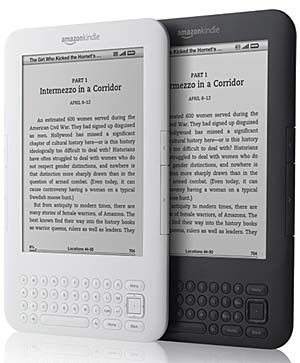
Key Features of Kindle Keyboard (Kindle 3)
1. E-Ink Display for an Enhanced Reading Experience
The Kindle Keyboard is equipped with a 6-inch electronic ink (E-Ink) display, which provides a sharp and clear reading experience. Compared to earlier versions, the contrast of this display was improved by 50%, making text and images more legible even in direct sunlight.
2. Compact and Lightweight Design
Despite featuring a physical keyboard, the Kindle Keyboard was designed to be 21% smaller and 17% lighter than its predecessor. Weighing approximately 240 grams, it offers enhanced portability, making it ideal for long reading sessions.
3. Extended Battery Life
One of the most notable features of the Kindle Keyboard is its impressive battery life. With wireless connectivity turned off, a single charge allows up to one month of usage, making it an excellent choice for frequent travelers and avid readers.
4. Ample Storage Capacity
The device includes 4GB of internal storage, which allows users to store approximately 3,500 e-books, eliminating the need for external storage options.
5. Multiple Connectivity Options
The Kindle Keyboard offers both Wi-Fi and 3G connectivity options. The 3G model enables users to download books and sync their Kindle libraries even without access to Wi-Fi networks.
6. Physical Keyboard for Efficient Navigation
Unlike newer touch-screen Kindles, the Kindle Keyboard features a full QWERTY keyboard that enhances note-taking and text searches within e-books. This feature makes it particularly suitable for academic and professional users.
7. Enhanced PDF Support
This model significantly improved PDF handling, offering features like zooming, annotation, and text selection, making it more versatile for document reading.
Battery Replacement for Kindle Keyboard (Kindle 3)
Over time, the battery life of any electronic device will degrade. If you find that your Kindle Keyboard is not holding a charge as well as it once did, replacing the battery can significantly improve performance. The Amazon Kindle GP-S10-346392-0100 replacement battery is the perfect solution for restoring your Kindle Keyboard’s battery life.

Why Choose the Amazon Kindle GP-S10-346392-0100 Replacement Battery?
-
High Capacity & Performance: With a 1750mAh/6.5Wh capacity, this lithium-ion battery provides long-lasting power.
-
Certified for Safety: It meets international safety standards, including CE, UL, ROHS, and ISO9001/9002 certifications.
-
Guaranteed Quality: Each battery is tested to ensure durability and optimal performance.
-
One-Year Warranty & 30-Day Money-Back Guarantee: Providing peace of mind with every purchase.
Purchase the Amazon Kindle GP-S10-346392-0100 replacement battery here
How to Replace the Kindle Keyboard Battery
Tools Required:
-
Small Phillips screwdriver
-
Plastic prying tool
Step-by-Step Guide:
-
Power Off the Kindle: Ensure your Kindle Keyboard is turned off before beginning the process.
-
Remove the Back Cover: Use a plastic prying tool to carefully remove the back cover without damaging the casing.
-
Locate the Battery: The battery is secured with a small screw and a connector.
-
Unscrew and Disconnect the Battery: Use a Phillips screwdriver to remove the battery screw, then gently unplug the battery connector.
-
Insert the New Battery: Connect the Amazon Kindle GP-S10-346392-0100 replacement battery, ensuring a secure fit.
-
Reassemble the Device: Secure the battery with the screw, replace the back cover, and power on your Kindle to confirm proper functionality.
For detailed specifications and to purchase your replacement battery, visit: https://www.batteriestar.com/detail/Amazon%20Kindle/GP-S10-346392-0100/1737328
Conclusion
The Kindle Keyboard (Kindle 3) remains a beloved e-reader due to its long battery life, high-contrast E-Ink display, and efficient keyboard navigation. However, as battery life diminishes over time, replacing the battery with the Amazon Kindle GP-S10-346392-0100 can restore the device to optimal performance. By following this guide, Kindle users can continue to enjoy uninterrupted reading for years to come.
For a reliable and high-quality replacement battery, purchase now at: https://www.batteriestar.com/detail/Amazon%20Kindle/GP-S10-346392-0100/1737328
Page 33 of 88